Crypto wallet and gift card exchange

The calm way to hold, trade and cash out crypto.

One portfolio for your coins, cash and gift cards. See the rate before you confirm, then withdraw to your bank in your own currency.

Installs from your browser. Get on Android

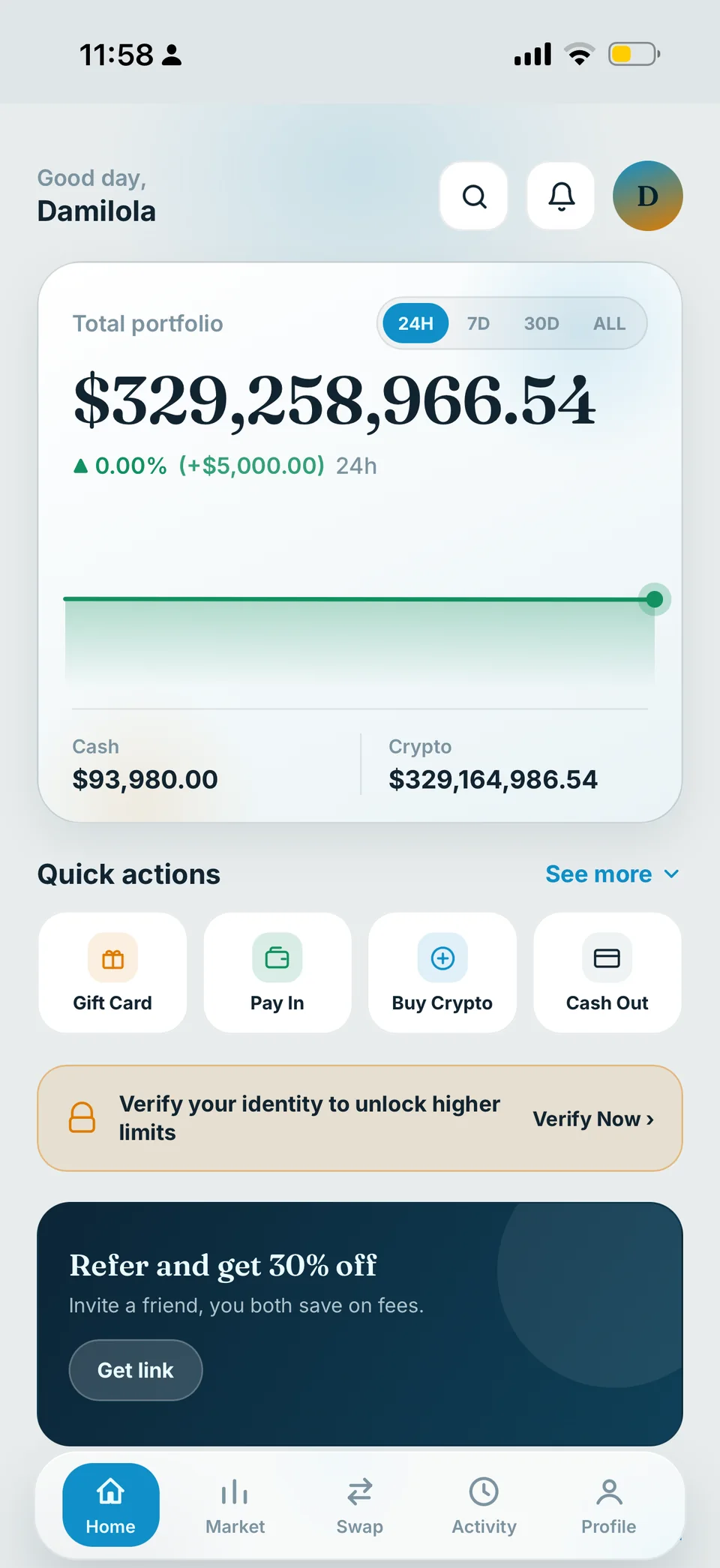
Clova app home screen: total portfolio with a 24H, 7D, 30D and ALL chart, quick actions for Gift Card, Pay In, Buy Crypto and Cash Out, and a bottom bar with Home, Market, Swap, Activity and Profile
Sell a gift cardSee your rate first
MarketsLive prices
Cash out to your bankIn your own currency
8blockchain networks for deposits
30currencies to cash out in
—gift card brands accepted

Gift cards in the drawer? Turn them into balance.

Amazon, Apple, Steam, Google Play and more. Pick the brand, enter the value, and see exactly what you'll receive before you submit. See today's rates.

Amazon gift cardApple iTunes gift cardGoogle Play gift cardSteam gift cardeBay gift cardWalmart gift cardTarget gift cardNike gift cardPlayStation gift cardXbox gift cardNetflix gift cardRazer Gold gift cardVanilla Visa gift cardSephora gift cardAmerican Express gift card

Everything you hold, in one calm place.

Clova brings crypto, cash and gift cards together, so you spend less time switching apps and more time knowing where you stand.

Eight networks, one wallet

Deposit Bitcoin, Ethereum, USDT, USDC and more. Every account gets its own deposit address for each coin, so incoming funds are matched to you automatically.

Swap with the rate in view

Move between cash and crypto in a couple of taps. A review screen shows what you pay and what you receive before you confirm. Amounts shown are examples at the current Clova rate.

Cash out in your own currency

Withdraw to a saved bank account in 30 currencies, from naira and cedis to euros and pounds.

Hear about it first

Push notifications and live in-app alerts for deposits, orders and withdrawals.

Markets worth watching

Prices, 24-hour moves and charts for every coin. Filter by gainers, losers or your own assets.

Bring a friend

Invite a friend and you both save on fees. Share your link from the app and track what it earns.

From card to cash in three steps.

No spreadsheets, no guesswork. Each step shows you what happens next.

  1. 1

    Choose what you have

    Pick a coin or a gift card brand and enter the amount. The rate is on screen before you go any further.

  2. 2

    Review and confirm

    Check what you pay and what you receive, then confirm with your PIN.

  3. 3

    Keep it or cash out

    Hold the balance in your Clova wallet, or withdraw to your bank in local currency.

One screen shows where you stand.

Open the app and your total, your shortcuts and your holdings are already there. Tap a topic to look closer.

Clova app home screen with the selected area highlighted

See your payout before you commit.

Pick a gift card or a coin and get an estimate in seconds, using the same live rates you see in the app.

Loading live rates

Loading live rates…

You'd receive about—Loading live rates

Rates are live from Clova and shown before any fees. The final amount is confirmed on the review screen in the app.

Sell in the app

Built so your account stays yours.

  • PIN on every money move

    Transfers, swaps and withdrawals only go through after you confirm with your PIN.

  • Passkeys and biometrics

    Unlock with your fingerprint or face on supported devices, so there's less to remember and less to steal.

  • One-time sign-in codes

    Codes are sent to your email and rate-limited, which makes them hard to guess by brute force.

  • Your own deposit addresses

    Each coin gets an address derived just for your account, and address keys can be rotated when needed.

  • Identity verification

    Verify your identity to unlock higher limits. Document checks help keep accounts, and the people who trade on them, genuine.

Questions, answered.

Still stuck? Open a support ticket from inside the app and we'll pick it up. More answers live in the help center.

Operator
Clova Financial Inc.
What it is
Crypto wallet and gift card exchange
Assets
BTC, ETH, USDT, USDC and more across 8 networks
Cash out
Bank withdrawals in 30 currencies
Platforms
Web app for iPhone and Android, plus an Android APK
Cost to join
Free
What is Clova?
Clova is a crypto wallet and gift card exchange operated by Clova Financial Inc. You can hold Bitcoin, Ethereum, USDT, USDC and more, sell gift cards, swap between cash and crypto, and withdraw to your bank in your own currency.
How do I sell a gift card?
Choose the brand and country, enter the card value, and Clova shows the rate and your payout before you submit. Add the card details and a receipt image, confirm, and the payout is added to your wallet once the card is verified.
Which coins and networks can I use?
Bitcoin, Ethereum, USDT and USDC, across a network list that also covers Litecoin, BNB Chain, Polygon, Tron, Solana and XRP. Open the deposit screen to see which assets are live in your account.
Can I withdraw to my local bank?
Yes. Save a bank account in the app and withdraw in your own currency. Thirty currencies are supported, including NGN, GHS, KES, ZAR, EUR and GBP.
Do I need to download an app?
Clova installs straight from your browser. On iPhone, open clova.cc/app in Safari, tap Share, then Add to Home Screen. On Android you can tap Install when your browser offers it, or download the Android APK. It opens full screen and works like any other app.
How are rates and fees shown?
Gift card rates are set by Clova and published on the gift card rates page. Crypto rates follow live CoinGecko market prices and are shown at the Clova rate. Every sale, swap and withdrawal has a review screen that lays out what you pay and what you receive before you confirm.
Is Clova free to join?
Creating an account is free. Any rate or fee that applies to a transaction is shown on the review screen before you confirm it.
How does Clova keep my account secure?
Money movements need your PIN, you can unlock with passkeys or biometrics on supported devices, sign-in codes are sent to your email and rate-limited, each coin gets a deposit address derived for your account, and identity verification unlocks higher limits.
What if something goes wrong?
Open a support ticket from your profile. You'll get updates as notifications, and your full activity is always available in History.

See your rate first. Then decide.

Create a free account, look around, and only move money when the numbers feel right.

Add Clova to your iPhone

  1. Open clova.cc/app in Safari.
  2. Tap the Share button at the bottom of the screen.
  3. Scroll down, tap Add to Home Screen, then tap Add.
Open Clova